 Burn
Get Burn
Burn
Get Burn
Burn
Get Burn
Burn
Get Burn
HOME / FEATURES / IN-FAST SUPPORT
Hunger comes in waves that peak and pass, whether you eat or not. Open Struggle Support and Burn gives you something to do for the length of one wave.
One tap from the timer, at whatever hour you need it. One of the six checks your symptoms and tells you when to eat.

6
tools, reachable in one tap from the timer
20:00
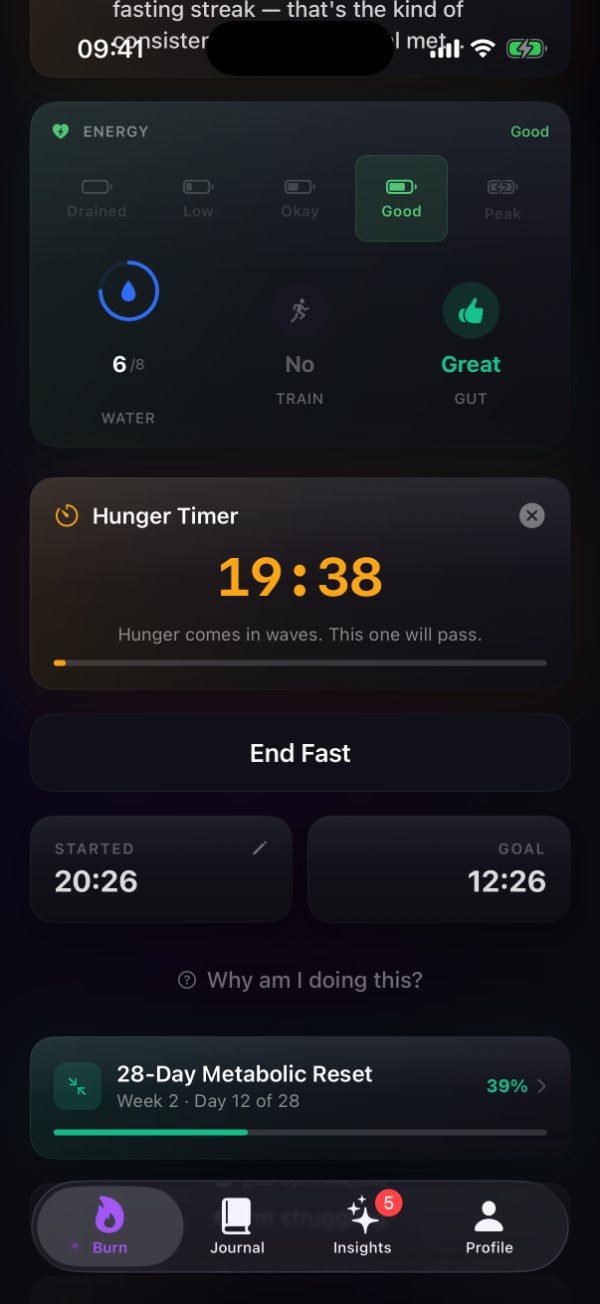
the 20-minute rule, running on your home screen
0
food photos to log, ever
The six tools
They are deliberately different from each other. Some give you a task, some give you information, and one tells you when to stop.
Hunger passes in 20 minutes
Start a timer and wait out the wave. It runs on your home screen next to the fast itself, so you can watch the thing you have to outlast actually count down.
Thirst disguised as hunger
Thirst and hunger are easy to confuse. Drink a glass, log it, and see whether the feeling was hunger at all.
Check if it's normal
Tell Burn what you are feeling and it tells you whether it is normal or whether you should end the fast and eat. This one is allowed to override the goal.
Your goal and progress
The goal you set when you started, and how far into the fast you already are, shown back to you at the point it is useful.
Personalized encouragement
Encouragement drawn from your own record rather than a generic quote. What you have already done is usually the most persuasive thing available.
Things to do right now
Something to occupy the next few minutes. Twenty minutes is much shorter when you are not sitting still counting it.
Why twenty minutes
Hunger is not a line that climbs until you eat. It arrives in waves, often on the schedule your old meals used to keep, and each wave subsides on its own.
That is why a timer works where willpower does not. You are not resisting hunger indefinitely, you are outlasting one wave, and the countdown shows you exactly how much is left of it.
Read: hunger while fasting →
The symptom check
Most of what you feel during a fast is ordinary and passes. Some of it is a reason to eat now. The symptom check exists to tell those apart, and it will tell you to stop.
One tap from the timer, without leaving the app or searching for an answer elsewhere while you feel unwell.
Much of what people feel during a fast is ordinary and subsides. The check says when that applies.
When it is not, Burn says so and ends the fast with you. No goal is worth overriding that.
Burn is a tracking tool and nothing in it is medical advice. If you are pregnant or breastfeeding, have a history of disordered eating, manage diabetes, or take medication timed with food, speak to a clinician before fasting.
Where it lives
The support tools are not buried in a menu. They sit on the fast screen with your water count, your check-ins, and the stage you are in, because that is the screen you are already looking at when it gets hard.
Start the 20-minute timer and it stays visible there until it finishes.
Everything on the fast screen →
HUNGER · 5 MIN
Why it comes in waves, and why the waves pass.
HYDRATION · 6 MIN
Salt, water, and most fasting headaches.
SYMPTOMS · 4 MIN
The signs that mean eat now, not later.
STAGES · 6 MIN
Where you are when it feels hardest.
All six are in the app from the first fast, one tap from the timer.
Download free on the App StoreiPhone, iPad, and Apple Watch. Requires iOS 18 or watchOS 11.